Public vs. Private IP Addresses: What’s the Difference?
An IP address is a unique network identifier that allows devices to communicate over IP networks. When it comes to IP address accessibility, they are usually categorized as public or private. This blog post explains the differences between private and public IP addresses.
What is an IP Address?
An IP address is a unique numeric or alphanumeric identifier assigned to devices connected to a network. IP addresses are used to receive and send data on a network. IP addresses are of different types.
By network type, IP addresses are categorized as public or private. Private IP addresses are intended for private networks and are not routable on the public internet. Today, IP addresses come in two different versions: IPv4 and IPv6.
|
IP Version |
Example |
|
IPv4 |
192.168.1.1 |
|
IPv6 |
2001:db8::1 |
What is a Public IP Address?
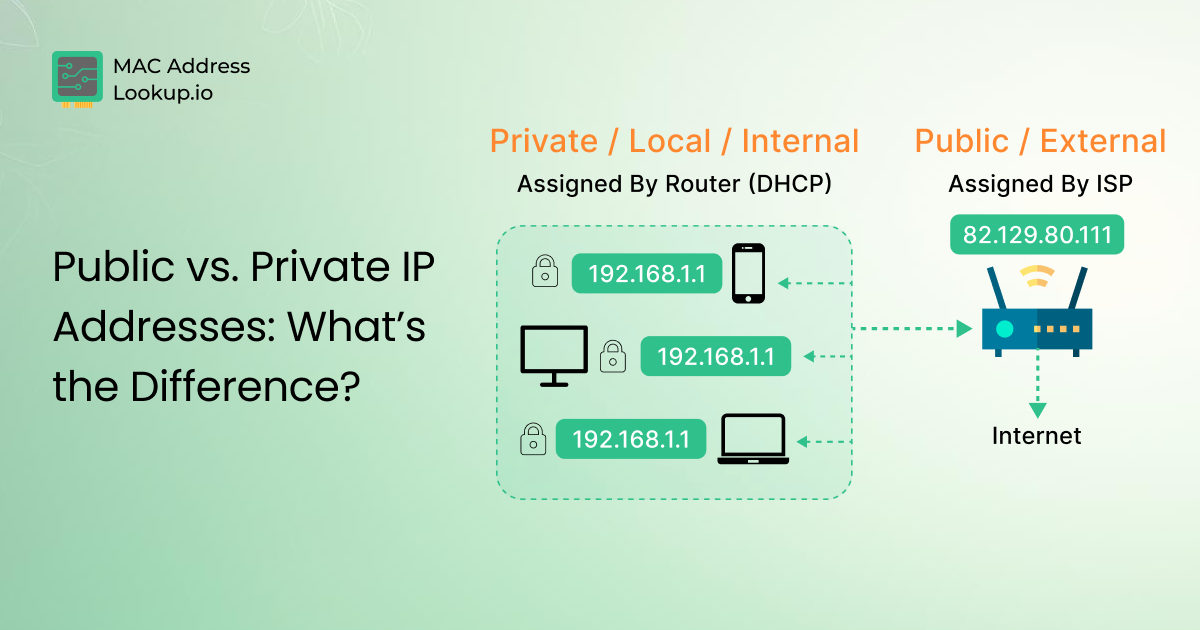
A public IP address is a globally routable IP address that enables communication over the public internet. Websites and devices communicate over the internet with other networks using public IP addresses. Public IP addresses are assigned by Regional Internet Registries (RIRs) such as ARIN, RIPE NCC, APNIC, LACNIC, and AFRINIC, which allocate address blocks under IANA’s authority.
A public IP address is assigned by your internet service provider (ISP), which leases a block from its regional registry and assigns individual addresses. For websites, public IPs are usually assigned by hosting service providers from their allocated block.
However, most devices on a home or office network have a private IP address. The router typically holds the public IP address used to communicate with the internet. Devices behind a router appear on the internet using the router's public IP address through Network Address Translation (NAT). The private IP address remains hidden and is used for internal network communications only.
Are Public IP Addresses different from External IP Addresses?
No, both public and external IP addresses are the same terms that are used interchangeably. Whether you call it public IP or external IP, the primary purpose remains the same:
- A public IP address allows devices or servers to communicate over the public internet.
Can You Track Public IP Addresses?
Yes, public IP addresses can be traced to some extent, such as by your ISP. For example, performing an IP location lookup on a public IP address can reveal the approximate geolocation of your connection. In fact, Web servers often log visitors' public IP addresses for analytics, security, fraud prevention, and rate limiting. Such data can be used to analyze users' online behavior patterns when visiting their websites.
Is it Possible to Hide a Public IP Address?
Yes, you can hide your public IP address using different methods. Common methods include using a VPN, a proxy server, or a web browser like Tor that lets you browse the internet anonymously.
What is a Private IP Address?
Private IP addresses (sometimes called private network addresses) are assigned by network routers to the connected devices. Every device connected to a single router will receive a unique private IP address for internal communication within the same network.
Devices with private IP addresses can communicate locally without using the internet and can access the internet through a router using NAT.
Since private IP addresses are not routable on the public internet, they are typically protected from direct internet access. Firewalls and other network security controls provide additional protection. This adds a layer of safety at home or in the office.
For example, you can print from your laptop to your home printer. But your neighbor cannot send anything to your printer.
Also, your router uses these addresses to send data to the right device. So when you search for something, the result goes back to your computer, not to someone else’s phone on the same network.
Are Private, Local, and Internal IP Addresses Same?
Just like public IP and external IP mean the same thing, private IP, local IP, and internal IP also refer to the same idea. A private IP is often called a local or internal IP.
All three terms describe the address your device uses inside your own network. You can use any of these terms, and the meaning stays the same.
Can You Track Private IP Addresses?
Yes, private IP addresses can be tracked, but only inside your own network. Devices on the same network can identify and communicate with each other's private IP addresses.
However, people on the internet cannot see your private IP. Your router uses your public IP for online communication. So your private IP stays hidden from the outside.
What Are Public and Private IP Address Ranges?
Private IP addresses are assigned from fixed ranges reserved for internal use. These ranges are administered by the Internet Assigned Numbers Authority (IANA) and defined in RFC 1918 (published by the IETF). These are only for internal networks, so they should not appear on the internet.
Here are the main private IP ranges:
|
Historically |
CIDR block |
Address Range |
Subnet mask |
Total Addresses |
|
Class A network (1) |
10.0.0.0/8 |
10.0.0.0 – 10.255.255.255 |
255.0.0.0 |
≈ 16.7 million |
|
Class B Networks (16) |
172.16.0.0/12 |
172.16.0.0 – 172.31.255.255 |
255.240.0.0 |
≈ 1 million |
|
Class C Networks (256) |
192.168.0.0/16 |
192.168.0.0 – 192.168.255.255 |
255.255.0.0 |
≈ 65,000 |
These are commonly referred to as the Class A, Class B, and Class C private IP ranges. The naming comes from classful networking, the original IPv4 addressing system, which was replaced by CIDR (Classless Inter-Domain Routing) in 1993. These ranges may look big, but they work well for private networks. Also, different networks can reuse the same ranges without any issue. That is why many homes and offices use similar private IPs.
For example, you will often see IPs that start with 192.168. This is the most common range used by routers.
On the other hand, public IP addresses are globally routable addresses that are not part of reserved or private address ranges. Each public IP must stay unique because it connects devices over the internet.
Difference Between Public and Private IP Addresses
|
Feature |
Public IP Address |
Private IP Address |
|
Purpose |
Used for communication over the internet |
Used for communication inside a local network |
|
Visibility |
Visible on the internet |
Hidden from the internet |
|
Assigned By |
Internet Service Provider (ISP) via RIR |
Network router Via DHCP |
|
Accessibility |
Anyone on the internet can reach it |
Only devices inside the same network can access it |
|
Usage Area |
Wide Area Network (WAN) |
Local Area Network (LAN) |
|
Uniqueness |
Must be unique worldwide |
Can repeat in different networks |
|
Security |
More exposed to online threats |
Adds an extra layer of network safety |
|
Examples |
|
How to Find Public and Private IP Addresses?
Finding a public IP address is quite easy. Simply Google "What’s my IP Address” or visit the IP Checker tool. The numeric values you will see next to IPv4 or IPv6 are the public IP addresses your device is using.
To find a website’s public IP address, use domain IP lookup tool. Enter the valid domain name into the said tool and run a website IP lookup. You will see the website’s public IP address in the results.
Regarding finding the private IP address, methods vary with OS.
Finding Private IP On Windows (PC or Laptop)
First, open the Command Prompt:
- Press Windows + R
- Type cmd and hit Enter
- Now type this command: ipconfig
Look for the IPv4 Address under your active network. That number (something like 192.168.x.x or 10.x.x.x) is your private IP.
Private IP on macOS
- Click the Apple menu
- Go to System Settings → Network
- Select your connected network (Wi-Fi or Ethernet)
You will see your private IP listed there.
Private IP On Android
- Open Settings
- Go to Wi-Fi
- Tap your connected network
You will find your IP address in the details section.
Private IP On iPhone (iOS)
- Open Settings
- Tap Wi-Fi
- Tap the (i) icon next to your network
Your private IP appears under IP Address.
Bottom Line
A public IP address is the one that your ISP assigns to your network. Devices connected to that network connection communicate over the internet using this address. It is visible online, using a public IP address, that some of your information, such as IP geolocation, can be tracked.
While a private address is assigned by the networking router and is not visible outside that local network. Private IP is only used for communication between local devices on the same network. These are the key differences between public and private IP addresses.