


Blacklist Checker - Checks Domain, IP, & Email Blacklist
This blacklist checker utility performs 3 different types of checks:
- IP blacklist check
- Domain blacklist check
- Email blacklist check
Our blacklist lookup utility scans your input against 29 reputation databases, including DNSBLs and RBLs. It tells you if your provided IP address, domain, or mail server appears in any blacklist and reputation databases.
How Can You Perform a Blacklist Check?
Our domain and IP blacklist checker makes it easy for you to perform blacklist checks and get accurate resutls. The actual steps vary depending on whether you want to perform an IP blacklist lookup or a blacklist email check.
Email Blacklist Check
To check if an email address is on a blacklist:
- Open this email blacklist checker
- Enter your email address in the input box
- Choose between A and MX record
- Press ‘Enter’ or click ‘Check in Blacklists’
The tool will instantly scan the provided email address across 29 different databases. You will get a detailed preview of resutls telling whether the address appears on any blacklist database.
IP Blacklist Check
To perform an IP address blacklist check:
- Add the public IP address inside the input box
- Press ‘Enter’ or click ‘Check in Blaclists’
- Let the tool complete the IP blacklist lookup
- You will get results on your screen
Domain Blacklist Check
This tool also gives accurate domain blacklist check results. To perform domain blacklist checking:
- Type or paste a domain name inside the input field
- Choose between MX or A records
- Press ‘Enter’ or click ‘Check in Blacklists’
- You will see if the domain appears on any blacklist
Results You Get from Blacklist Checker
Our blacklist checker provides you with detailed resutls, whether it’s an email address, an IP address, or a domain name. You get a summary helping you judge the blacklist stauts of the provided input instantly, along with the status from each blacklist database checked.
Blacklist Summary

At the top of the results, you will see a quick summary that includes:
- Listed: Number of blacklist databases that have listed your IP, domain, or email.
- Timeout: The databases that did not respond before the request timed out.
- Offline: These are databases that were unavailable during the blacklist scan.
- Not Listed: Databases where your input has a clean reputation.
Blacklist Status
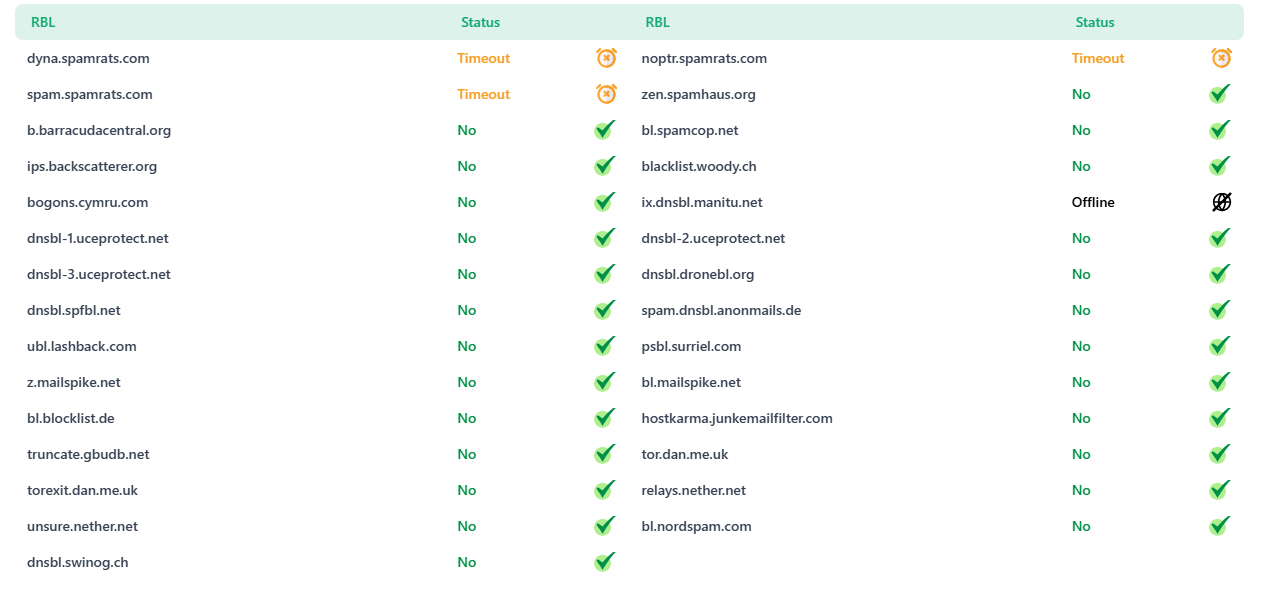
Below the summary, you get a detailed list of all 29 blacklist databases it checked. For each database, you will see:
- Name of the blacklist database.
- Blacklist status of your IP, domain, or email (whether it is Listed, Not Listed, Timeout, or Offline).
Check All Configured IPs
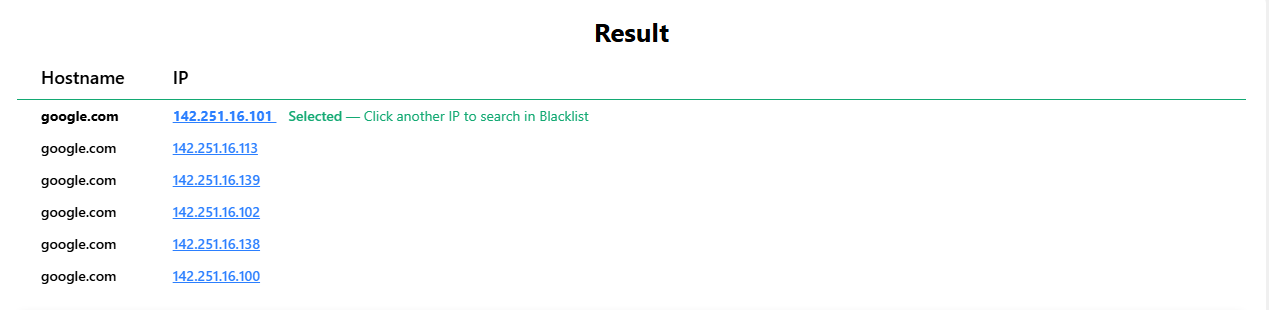
For websites and email addresses, you might see multiple IP addresses configured into the DNS setup (A or MX record). By default, you will see the results of the IP address at the top. To check the IP blacklist status for the remaining IP addresses, click the relevant IP.
Why Should You Check Blacklist Status?
Checking the blacklist status of your email or domain IP address lets you monitor reputation. A bad reputation can increase your website’s spam score and affect email deliverability.
Improve email deliverability
A blacklisted IP or domain can cause your emails to land in spam folders or get rejected. Our email blacklist checker helps you find issues early. By fixing those issues, you can keep your email reputation healthy.


Domain reputation
For websites, having a good domain reputation is a must. Getting a domain IP blacklisted harms its reputation. Our domain blacklist checkers tell you if your IP is blacklisted in any of the databases, so you can take action in time and protect your domain reputation.
Detect security issues
IP blacklist listing can sometimes point to security problems. For example, spam activity, malware, or a compromised mail server. Performing an IP blacklist check helps you spot these issues early, so you can fix them before they become more serious.


Monitor IP Reputation
Your IP address reputation affects how email providers and online services treat your traffic. If your IP has been temporarily blocked somewhere, it may be due to its appearing on a blacklist.
IP blacklist lookup helps you monitor your IP reputation and identify blacklist listings. If your IP appears on any blacklist, take action before they affect your emails or online services.
Frequently Asked Questions
Is my Email Spam Listed?
Run your email address through an email blacklist checker to see if it appears on a blacklist database like DNSBL or RBL. If your email address appears on blacklists, it can affect your email deliverability and cause your messages to land in spam folder.
Is my IP on a Blacklist?
Use IP blacklist checker to check if your public IP address is listed on blacklist databases because of suspicious activities. If your IP address gets blacklisted, it will affect your browsing and email-sending experience. You might get banned from accessing some websites, too.
What does it mean if your IP has been Banned?
If your IP has been banned or blacklisted, it means one or more services have marked it as suspicious or a source of spam. Because of getting IP banned, your emails may be blocked, sent to spam folders, or rejected until the issue is resolved.
What to do if your IP has been Temporarily Blocked?
If your IP has been temporarily blocked, check if it appears on an IP blacklist. Then fix the issue, such as stopping spam activity, removing malware, or correcting server settings. After that, request removal from the blacklist or wait until the temporary block expires.
How to remove IP from Blacklist?
To remove your IP from a blacklist, first fix the issue that caused the listing, such as spam, malware, or a compromised server. Then submit a delisting request to the blacklist provider. Once the provider verifies the issue has been resolved, it will remove your IP from the blacklist.
Can a shared hosting IP become blacklisted?
Yes, a shared hosting IP can become blacklisted if another website or user on the same server sends spam or engages in malicious activity.